

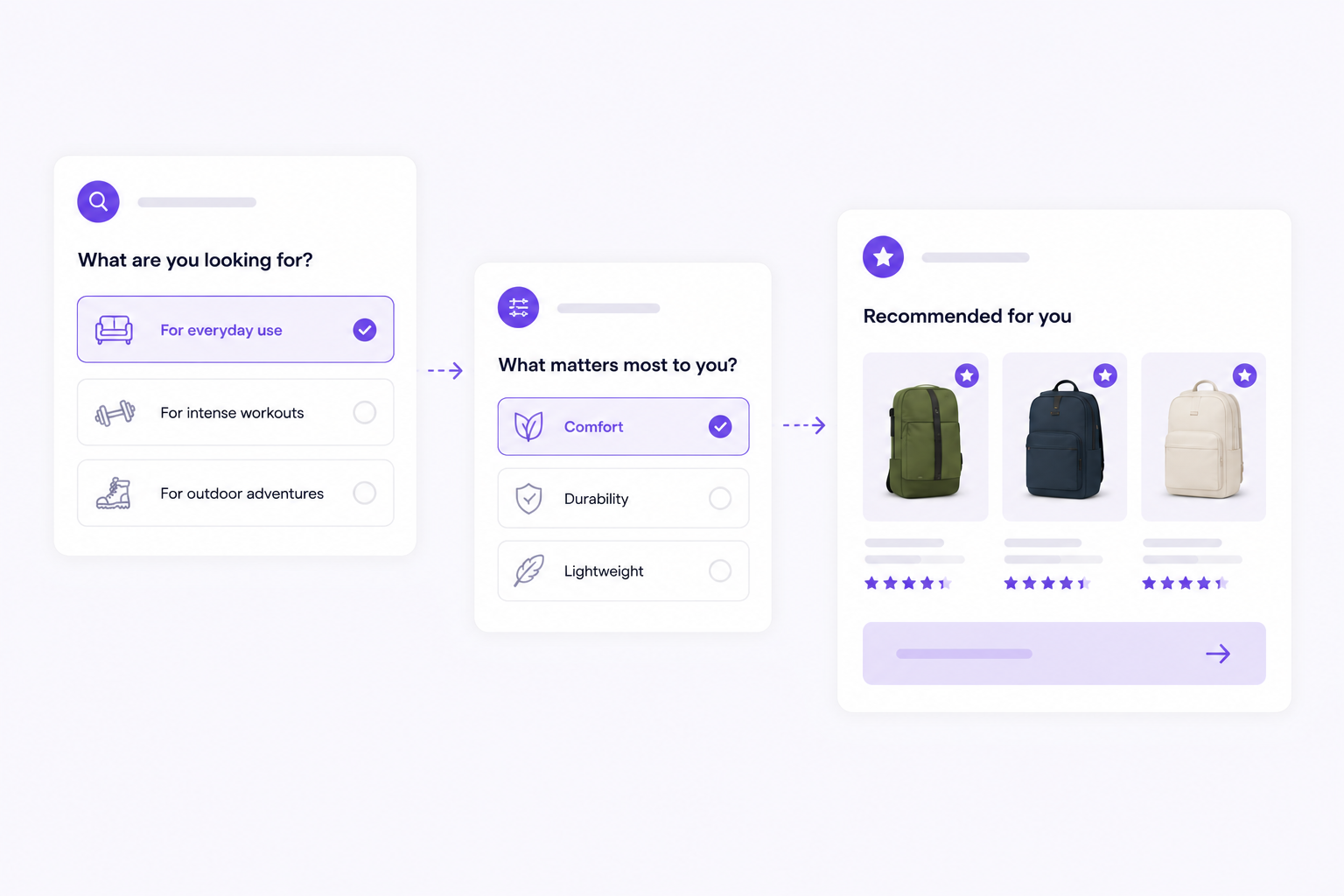
Product finder software helps shoppers choose when a normal product grid asks too much from them. Instead of comparing every filter, variant and specification by themselves, visitors answer a few focused questions and receive product advice that fits their situation.
That is useful for ecommerce stores where the right choice depends on use case, size, compatibility, preference or experience level. Think of skincare, supplements, pet food, garden products, tools, electronics, spare parts, sports gear or B2B assortments.
A good product finder does not feel like a separate trick added to the webshop. It feels like calm, useful help at the moment the shopper needs it.
What is product finder software?
Product finder software lets ecommerce teams build an advice flow for their webshop. The visitor answers short questions. The software uses those answers to filter, score or rank products. The result is a recommendation with enough context to help the visitor take the next step.
Most product finders contain four parts:
- Questions that clarify the shopper's need.
- Product data such as attributes, use cases, sizes, materials or compatibility.
- Matching logic that decides which products fit best.
- A result screen with recommendations and a clear next step.
The goal is simple: help visitors find a suitable product faster, without making them do all the research alone.
When does a webshop need a product finder?
Not every webshop needs product finder software right away. If the product range is small and the choices are obvious, navigation and filters may be enough. A product finder becomes useful when shoppers compare, hesitate or need advice before buying.
Common signs:
- Visitors use many filters but do not click through.
- Support receives the same advice questions again and again.
- Products look similar but differ in important details.
- Customers often choose the wrong variant.
- Category pages contain many products without enough guidance.
- Your team has product knowledge that is not visible online yet.
That last point matters. Many ecommerce teams already know how to advise customers. The product finder simply turns that knowledge into a scalable online experience.
Product finder, quiz or filters?
These terms overlap, but they do not solve exactly the same problem.
Filters
Filters are useful when shoppers already know which specifications matter. For example size, price, color or brand. The problem starts when someone does not know which value fits their situation.
Most shoppers do not think: "I need material X with specification Y." They think: "What works for my skin?", "Which food suits my dog?" or "Which part do I need?"
Quiz
A quiz can be lightweight and engaging. It can work well for inspiration. But a quiz becomes much more valuable when the outcome is based on real product data and clear matching rules.
Without good matching, a quiz result can feel random. The shopper gets an answer, but not necessarily reliable product advice.
Advice flow
An advice flow combines short questions with real product logic. The Flow widget can be placed on a category page, product page, advice page or campaign page. The visitor receives a recommendation and a reason why it fits.
That is the difference between a fun quiz and a product finder that helps people make a better buying decision.
How product finder software works
A strong product finder starts with the decision the shopper is trying to make. It does not start with every product attribute in your catalog.
1. Choose one clear decision
Start small. For example:
- Which day cream fits my skin?
- Which plant food do I need?
- Which bike carrier fits my car?
- Which product suits this use case?
The more specific the decision, the easier the advice flow becomes.
2. Ask only questions that change the recommendation
Every question should affect the product advice. Do not ask for preferences you will not use.
Good questions are practical:
- What will you use the product for?
- What is the situation or use case?
- Are there limits such as size, material or compatibility?
- What matters most: price, ease, strength, durability or look?
Three to six meaningful questions are often enough for a first version.
3. Connect answers to product data
The product finder needs product data to match well. That data does not have to be perfect from day one. Start with the attributes that truly decide whether a product fits.
Examples:
- skin type, ingredient preference and routine step;
- age, weight and dietary needs for pet food;
- material, surface and application for tools;
- model, size and connector type for parts;
- budget, experience level and intensity for sports products.
The better your product data matches the questions, the stronger the recommendation becomes.
4. Show product advice with a reason
A recommendation without explanation can feel like a normal product list. Add a short reason why each product is shown.
For example:
- Fits sensitive skin and daily use.
- Suitable for small dogs with normal activity.
- Best choice when speed matters most.
- Compatible with this connector type.
The explanation does not need to be long. It needs to create confidence.
5. Place the Flow widget where doubt appears
Many stores place a product finder only on a category page. That can work, but it is not the only useful location.
Good placements include:
- category pages with many similar products;
- product pages where shoppers want to check fit;
- advice articles that currently end without a concrete recommendation;
- landing pages for campaigns or seasonal needs;
- customer service pages with recurring questions.
The best location is not always where the catalog starts. It is where the shopper gets stuck.
Practical examples
Skincare store
A shopper needs a cream but does not know which ingredients or texture fit. The advice flow asks about skin type, sensitivity, goal and routine. The product advice shows a best match, a budget-friendly alternative and an option for the evening routine.
Pet food
A webshop sells food for dogs and cats. The product finder asks about animal type, age, weight, activity and sensitivities. Products that do not fit are removed. The visitor sees only options that make sense for their situation.
Tools and spare parts
For technical products, shoppers often need compatibility guidance. The Flow widget asks about application, machine, size or connector. The result helps prevent wrong purchases and can recommend accessories or bundles.
Home and garden
A visitor wants plants for a balcony but does not know which types will survive there. The advice flow asks about sunlight, care level, available space and style. The product advice shows plants that fit the place and maintenance level.
What to look for in product finder software
Good product finder software should stay practical for your team. You should not need development work for every text change, question or recommendation update.
Look for:
- Editable flows.
- Product data matching.
- Flexible styling for the Flow widget.
- Recommendation explanations.
- Analytics for drop-off and click-through.
- Multilingual support.
- Calm implementation that does not rebuild the whole store.
Product finder software does not need to be heavy. The value is in better choices, less hesitation and product advice that matches your assortment.
Start small and improve
Many teams try to build the perfect product finder immediately. That usually makes the project too large.
Start with one category where advice makes a clear difference. Write down the questions your team already asks customers. Connect those questions to the most important product attributes. Publish a first advice flow and improve it with real behavior.
A practical first version:
- One entry point on a category page or product page.
- A short advice flow with up to six questions.
- Product data for the attributes that actually matter.
- A result screen with a best match, alternatives and explanation.
- Analytics to see where visitors drop off or click through.
After that, simplify questions, improve product data and add extra routes when needed.
Product finder software FAQ
Is product finder software the same as guided selling software?
Product finder software is often one form of guided selling software. A product finder helps shoppers choose within a category. Guided selling is broader and also includes advice logic, placement, product data, explanations and optimization.
Do you need perfect product data?
No. Start with the product data used in the advice flow. You can expand later. Five reliable attributes are better than twenty fields that are incomplete or unclear.
Where should you place a Flow widget?
Place the Flow widget where shoppers hesitate. Often that is a category page, but product pages, advice articles and campaign pages can be just as valuable.
Does a product finder work for smaller stores?
Yes, if the choice is complex enough. A store with 40 products can need more advice than a store with 400 simple products. It is not only about assortment size. It is about choice stress.
Start with product finder software
With %app_name%, you can build an advice flow, connect product data and publish the Flow widget on your webshop. That gives visitors practical product advice without rebuilding the entire store.
Try the demo, read how to build an advice flow, or learn more about product data for matching.
Quick answers
Is guided selling better than filters?
Where should a product finder live?
Do I need developers for every change?
Keep building the picture
A few useful next reads and product pages that connect this article to the rest of the guided selling stack.
Useful product pages